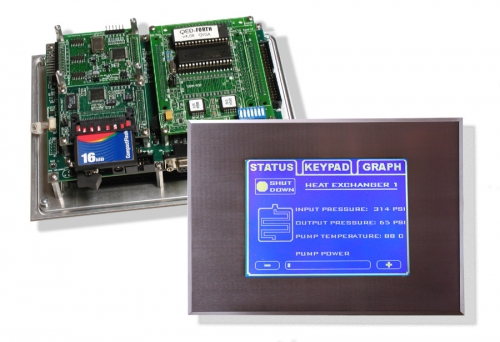
QVGA Controller
The QVGA Controller™ features a touchscreen controlled graphical user interface. Combining a high-contrast 6" diagonal 1/4-VGA display and high resolution analog touchscreen, it comes complete with object-oriented menuing software that makes it easy to control your application using buttons, menus, graphs, and bitmapped pictures.
The QVGA Controller is an excellent programmable controller for embedded systems, SCADA, instrumentation, industrial automation, PID control, process control, microcontroller projects, and as the front panel of scientific instruments.
Display your own custom graphics on a bright white-on-blue cold-cathode fluorescent (CCFL) backlit LCD. Display screens and graphics objects are quickly developed with most Windows paint programs, such as PC Paintbrush, allowing you to create sophisticated displays including your company logo, system diagrams, and icon-based control panels. Real-time data plotting routines are precoded for you, so the user can see what your instrument is doing. Your application's startup screen executes automatically on power-up.
Use the QVGA Controller as your instrument front panel boasting hundreds of screens, each with software configurable buttons and menus. A precoded menu manager simplifies menu-driven control, making it easy to define buttons, menus, icons, and their associated actions. With the touch or release of a button, the menu manager responds, sending an appropriate command to your application program. Onboard software draws the screen graphics and responds to button presses for you, so you can focus on your application.
Need Protection from an Aggressive Environment?
Consider our Environmental Gasket to provide a tight, chemically resistant seal between your touchscreen and bezel and to prevent infiltration of dust or liquids.
Looking to Order?
- You can find price and delivery information on Mosaic's website, or contact us directly.
- You may also want to expand your I/O capabilities with some Compatible Accessories.
If you don't find an answer in the documents here, feel free to contact us for help with your application.
If you have just purchased the QVGA
For guidance on using the QVGA, take a look at the following documents: