
QScreen Controller
Highly integrated touch panel embedded computer with microcontroller, GUI touchscreen and LCD display
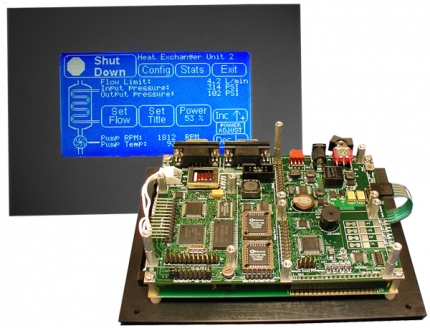
The QScreen Controller™ combines a C-programmable single-board computer (SBC) with a touchscreen-operated graphical user interface (GUI). It directly hosts expansion IO (input-output) boards and includes pre-coded GUI and device driver software. Designed as a fully-functional, compact industrial PC powered by a Freescale 68HC11 microcontroller, this low-cost embedded computer is ideal for OEM applications where installation space is critical, such as embedded systems, scientific instruments, robotics, and portable data acquisition. The QScreen can be commanded remotely from a PC or used stand-alone providing real-time control of dozens of analog and digital I/O lines.
State-of-the-art operator interface
Today's tech-savvy customers demand sophisticated yet easy-to-use LCD touch-panel user interfaces for embedded control, also referred to as human-machine interfaces HMI or man-machine interfaces MMI. Mosaic provides software tools to help you quickly develop menu-based man-machine graphical interfaces that respond to the user's touch.
The QScreen Controller sports a touchscreen-operated graphical user interface on a high-contrast 128x240 pixel liquid crystal display (LCD) with a 5x4 touchscreen overlay. It comes complete with object-oriented menuing software that makes it easy to control your application using buttons, menus, graphs, and bitmapped pictures.
Display your own custom graphics on a bright white-on-blue cold-cathode fluorescent (CCFL) backlit screen. You can create hundreds of sophisticated screens for this low-cost single board computer, including your company logo, system diagrams, and icon-based control panels using most Windows paint programs, such as PC Paintbrush. Startup screens and your application program will execute automatically on power-up.
Need protection from an aggressive environment?
Consider our Environmental Gasket and Screen Protector to provide a tight, chemically resistant seal between your touchscreen and bezel and to prevent scratching & infiltration of dust or liquids.
Looking to Order?
- You can find price and delivery information on Mosaic's website, or contact us directly.
- You may also want to expand your I/O capabilities with some Compatible Accessories.
If you don't find an answer in the documents here, feel free to contact us for help with your application.
If you have just purchased the QScreen
For guidance on using the Qscreen, take a look at the following documents: