![]() |
![]() |
![]() |
|
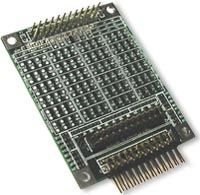
The I/O Filter WildcardTMThis Wildcard filters or conditions the I/O lines of other Wildcards.![]()
The I/O Filter Wildcard provides a place for prototyping analog circuitry or for filtering or conditioning I/O lines of other Wildcards. Twenty-four I/O lines can be independently filtered, or their signals can be combined in custom ways. Two 24-pin connectors are used for input and output; one generally mates to the field connector of a Wildcard I/O module, while the other connects to your external signals. A third connector accommodates the Wildcard Bus, which can be used for power and ground. Up to four through-hole and four surface-mount components can be soldered onto the board to filter each of the 24 I/O lines. Connecting to the I/O Filter WildcardThe I/O Filter Wildcard is a nearly blank prototyping board with a sea of holes for mounting components and three 24-pin headers. The headers/connectors are used as follows: H1 - Wildcard Bus Connector The Wildcard Bus connector is a 24-pin stacking/go through header/socket that allows the I/O Filter Wildcard to stack on other Wildcards. You can use the power and ground signals on it to power your custom circuitry or to provide signal references. H2 - I/O (Input) Connector The I/O or Input connector is a 24-pin header that you use to connect to your external I/O devices. H3 - Wildcard Field Connector (Output) The Wildcard Field (Output) connector is a 24-pin header that you can cable to any other Wildcard Field header. The following table describes the signals on each connector:
The shaded pins on the Wildcard bus, H1, would not usually be used; only the power and ground connections would generally be needed. If you are filtering inputs to a Wildcard, for each of the 24 I/O lines, you generally apply a signal to H2, the I/O (Input) Connector, you mount custom circuitry on the board to filter the signal, and the filtered signal is delivered to a corresponding pin on H3, the Wildcard Field Connector (Output). If you are conditioning outputs from a Wildcard, then the H3 connector becomes the input to the board, and the H2 connector the output. Of course, if it is more convenient you are free to connect H2 to a Wildcard filed header and H3 to your external devices. Signals may flow in either direction between H2 and H3 – what is important is that there is a one-to-one correspondence between the 24 pins on H2 and H3. I/O Filter Wildcard SchematicFigure 1 shows the schematic for four of the 24 circuits of the I/O Filter Wildcard; the others are identical. ![]()
Up to four through-hole or surface-mount components may be connected per circuit, or if both types are used up to eight circuit components may be used as shown in Figure 2. Some components connect the input pins to the output pins, while other components connect the signal path to either of two rails, a top rail, generally used for the positive power supply, and a bottom rail, generally used for the circuit ground. Figure 1 also shows several options for deriving the top and bottom rails. The top rail may be connected to the +5V or the V+RAW supplies by jumpering the pads (i.e., connecting a wire or zero ohm resistor) labeled V+ or +5. Similarly, the bottom rail can be connected to the Wildcard Bus ground, but jumpering the GD pads, or to a user supplied input on pin 3 of H2, by jumpering V-. The user supplied input would be generally used if a negative voltage is desired. These rails may be filtered by using resistors or inductors in place of the zero ohm jumpers and installing capacitors at positions F1 and/or F2. Or they can be protected against overvoltages by installing appropriate protection devices (such as zener diodes, SIDACTORs, or GDTs) at F1 and/or F2. Further, the rails may be derived from any of the input or output pins by installing shorts in appropriate component positions in the circuit of Figure 1. Figure 2 shows each of the twenty four circuits in more detail, showing the parallel pads for surface mounted components.
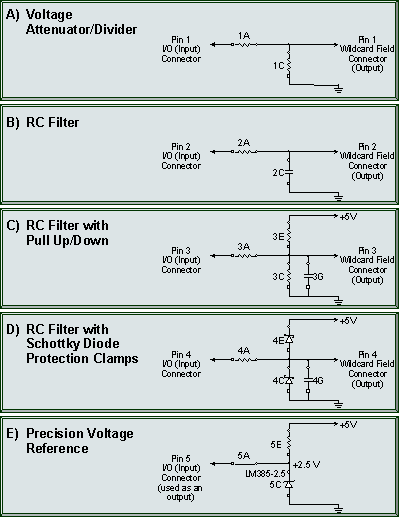
Possible CircuitsFigure 3 shows several of the most commonly needed filtering circuits.
![]()
Mounting Components on the I/O Filter WildcardFigure 4 (click to open in a separate window) provides a larger-than-life diagram of the top and bottom of the I/O Filter Wildcard so that you can easily see the positions and labels of the components. The large central region provides holes for through-hole components while surface-mount components use the periphery. The board’s silk-screen legend provides the same information, but the print isn’t always legible. You can use Figure 4 as a guide when soldering components to the board. Through-hole components are mounted in the large central region while surface-mount components are mounted in the peripheral areas. Note that the shapes of the through-hole pads, round or square, correspond to the connection symbols used in Figures 1-3. You should pay attention to these shapes when wiring polarized components. DocumentationI/O Filter Wildcard Manual pdf (1.8MB)
Home|Site Map|Products|Manuals|Resources|Order|About Us |