The EtherSmart Wildcard™
- access, monitor and control your instrument
over Ethernet
This Ethernet Wildcard Provides access via Local Area Networks and the World Wide Web
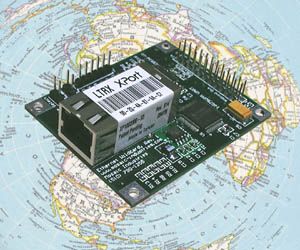
The EtherSmart Wildcard - Mosaic's low cost embedded Ethernet mezzanine board - makes it easy to put your instrument online. You can network your instrument in minutes - simply plug a standard Ethernet cable into the RJ-45 jack on the Wildcard, and your instrument can communicate with other computers on a Local Area Network (LAN). Your application program can send emails to alert other computers on the network when significant events occur.
The EtherSmart implements a dynamic webserver that accepts connections from your web browser, serving out static or dynamic web pages. Using the Mosaic ethernet driver, you can even "browse into" your web-connected instrument from an online PC to check its status. With serial to Ethernet communications, you can remotely access, monitor, program, and control your instrument.
This tiny 2" by 2.5" board is a member of the Wildcard series that connects to Mosaic embedded controllers. You can plug it into Mosaic controllers — QCard, QScreen, or PDQBoard — to deliver the benefits of Ethernet connectivity to your application.
Internet Protocol Support
The EtherSmart Wildcard implements the following protocols to establish and manage communications:
- TCP/IP (Transmission Control Protocol/Internet Protocol) for reliable data transmission with no lost data.
- ICMP (Internet Control Message Protocol) allows the device to send and return "ping" packets which are useful for network debugging.
- ARP (Address Resolution Protocol) establishes the correspondence between the 48-bit Ethernet (MAC) addresses and the 32-bit IP (Internet Protocol) address that identifies the parties on a network.
IP addresses can be assigned using a web configuration screen, via a telnet configuration session, or by calling an easy-to-use driver function from the application program. The simplest and most standard IP assignment method is to allow the host computer on the LAN to automatically assign an IP address to the EtherSmart Wildcard using DHCP (Dynamic Host Configuration Protocol) which is fully supported by the Wildcard.
Capable Hardware
The EtherSmart Wildcard is based on the Lantronix XPort™ that combines an x86 processor, flash memory, Ethernet network interface controller, and RJ45 jack into a single component. The XPort can support one Ethernet connection at a time. An on-board UART (Universal Asynchronous Receiver/Transmitter) chip provides the interface between the Wildcard bus and the XPort. The 3.3V supply that runs the XPort can be shut down while the interface is not in use to conserve power.
Software for Data Exchange, Email and Web Service
Most web pages are "static", meaning that their content does not change with each visit to the page. However, in the context of embedded computers, "dynamic" web pages that provide up-to-date status information about the computer's state (inputs, outputs, memory contents, etc.) are very useful. The pre-coded driver functions enable you to serve both static and dynamic web pages.
The "embedded web server" that runs when you execute the EtherSmart driver code responds to information requests from your browser. You can create a set of web pages, each with a specified name, or "URL" (Uniform Resource Locator) and an associated "handler function" that serves out the static or dynamic web content for the requested page.
Precoded software lets you open and close connections, exchange binary or ASCII data with the remote computer, send emails, and respond to sessions initiated by a web browser. By coding web content into your application, you can enable remote monitoring and control of your instrument from your web-connected PC. See also "Six Things to Look For in an Embedded Web Server".
Specifications
| Ethernet Port: |
Standard RJ45 jack hosts 10/100 Mbit Ethernet (autosending speed detection) |
| Protocols: |
HTTP, SMTP, TCP, DHCP, ICMP, ARP |
| Send Email: |
Deliver email with program-controlled content to a specified LAN IP address |
| Exchange Data: |
Open or accept a TCP/IP connection to send and receive binary or ASCII data |
| Browsable: |
Accepts connections from your web browser, serving out dynamic web pages as specified by your program. Use any web browser: Internet Explorer, Firefox, Chrome, Opera, Safari. |
| Drivers: |
Precoded software opens connections, exchanges data, sends email, and serves out web pages |


